Decorative V-Neck Embroidery Pattern SVG: What You Actually Need to Know Before Downloading
If you're designing ethnic wear, digitizing for embroidery machines, or creating premium print layouts for Panjabi, Kurta, or Kaftan necklines, a Decorative V-Neck Embroidery Pattern SVG isn’t just another digital asset—it’s a precision tool. But not all SVGs deliver what they promise. Many designers and small-batch producers assume “SVG” means universal compatibility, crisp scaling, or ready-to-stitch readiness—only to discover mid-project that paths aren’t expanded, stroke widths interfere with laser cutting, or the filigree details vanish when resized for sublimation prints.
Why This Pattern Matters Beyond Aesthetics
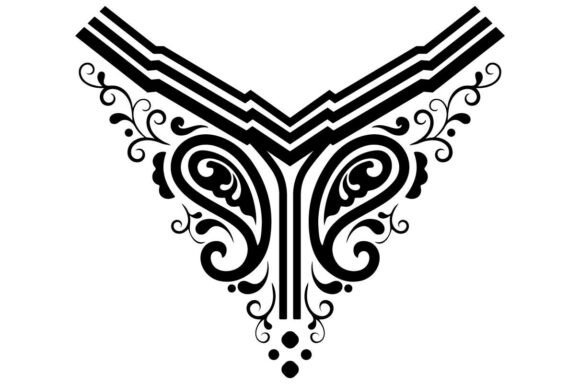
This isn’t decorative filler. The Decorative V-Neck Embroidery Pattern SVG is engineered for real-world production: clean vector-mapped outlines, fully expanded paths, and node-optimized curves ideal for embroidery machine digitizing, laser engraving on wood or leather, or high-resolution fabric printing blocks. Its filigree collar silhouette balances cultural authenticity with technical precision—supporting both traditional motifs (like henna-inspired tracery) and modern applications like luxury wedding invitation borders or ethnic t-shirt graphic layouts.
What makes it especially valuable? It ships as part of a ZIP bundle with SVG, DXF, EPS, and 300dpi PNG—not just one format, but a coordinated toolkit. That matters because your embroidery software may need DXF for stitch mapping, your Cricut or Glowforge prefers SVG with outlined strokes, and your print-on-demand partner requires a flattened, high-res PNG for mockup integration.
Mistake #1: Assuming “SVG” Means “Ready for Every Machine”
Many users download an SVG, import it into their embroidery digitizing software (like Wilcom or Pulse), and expect seamless auto-digitizing—only to find jagged edges, overlapping nodes, or unconverted strokes. Why? Because some SVG files retain live strokes, gradients, or text objects that don’t translate to stitch paths. This leads to stitching errors, thread breaks, or distorted filigree at scale.
Better approach: Verify that all paths are expanded and strokes converted to outlines *before* importing. The pattern you’re considering explicitly states “all paths and stroke nodes are cleanly expanded and vector-mapped”—so check the preview thumbnails or vendor documentation for confirmation. If in doubt, open the SVG in Adobe Illustrator or Inkscape and use Object > Path > Outline Stroke and Object > Expand to test responsiveness.
Mistake #2: Overlooking Format-Specific Use Cases
Using the same file across multiple workflows without adjustment causes avoidable friction. For example: applying the 300dpi PNG directly to a laser engraver (instead of the DXF or SVG) results in pixelation and loss of fine filigree definition. Or using the EPS version for web-based design tools like Canva—where EPS isn’t supported—wastes time troubleshooting imports.
Better approach: Match the format to the tool and output. Use SVG for Cricut Design Space or Silhouette Studio (with stroke expansion confirmed). Choose DXF for CNC routers or industrial embroidery systems. Rely on the 300dpi PNG only for digital mockups, social media previews, or non-vector print layouts where resolution—not scalability—is key.
Mistake #3: Ignoring Real-World Scaling Behavior
Filigree patterns look elegant at thumbnail size—but shrink them too much for a child’s kaftan neckline or stretch them too far for a luxury tote border, and delicate loops collapse, gaps widen, or proportions distort. Some designers skip test prints or physical samples entirely, assuming digital fidelity guarantees physical fidelity.
Better approach: Always run a 1:1 scale test cut or print before full production. Import the SVG into your design software, set document units to inches or cm, and verify that the smallest filigree element remains legible at your intended final size (e.g., 3.5" wide for a standard kurta collar). If detail blurs or merges, adjust spacing manually—or contact the creator for a scaled variant.
What to Check Before You Download or Purchase
- Path integrity: Does the listing confirm expanded strokes and compound paths? If not, ask. Unexpanded strokes cause inconsistent cuts on vinyl or fabric.
- Layer organization: Are elements grouped logically (e.g., outer frame vs. inner filigree)? Well-structured layers speed up editing for customizations like color blocking or motif removal.
- Commercial license clarity: Does the description explicitly permit use in client work, resale items (e.g., embroidered kurtas), or digital products (e.g., Canva templates)? Ambiguity here can risk copyright claims down the line.
- Preview accuracy: Compare the on-screen preview with a zoomed-in view of the actual SVG in your vector editor. Does the exported file match—especially in corner junctions and curve smoothness?
Real Applications, Real Results
A small-batch Panjabi label in Hyderabad uses this pattern to create custom neckline stencils for hand-embroidered pieces—printing the SVG onto freezer paper, ironing it onto fabric, then stitching over the guide. Because paths are pre-expanded, their stencil holds sharp edges through repeated wash-and-reuse cycles.
A freelance fashion illustrator in Toronto incorporates the same filigree silhouette into digital costume concept art for a South Asian theatre production. They isolate the EPS layer, recolor sections in Pantone, and export vector PDFs for print—no raster artifacts, no font substitution issues.
And a wedding stationery designer in Chicago uses the PNG version to build layered borders for digital invitation suites—then switches to the SVG for foil-stamping die-cut templates. The consistency between screen and press ensures the delicate V-neck motif reads clearly at 12pt size on ivory linen cardstock.
Final Thought: Precision Is Built—Not Assumed
A Decorative V-Neck Embroidery Pattern SVG only delivers value when its technical execution matches your workflow—not just your aesthetic goals. Don’t settle for “pretty preview + vague specs.” Look for clear statements about path expansion, format versatility, and production-grade optimization. When those foundations are solid, the filigree isn’t just decoration—it’s a reliable, repeatable, scalable component of your creative process.