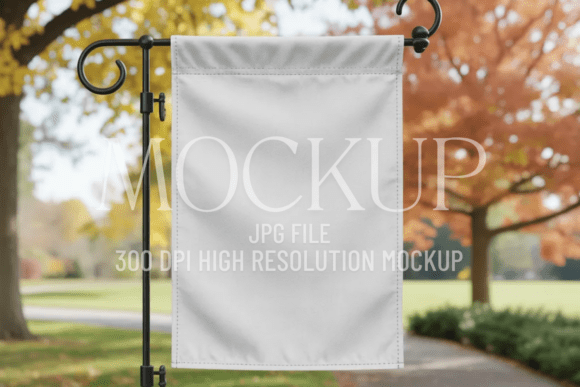
Fall Garden Flag Sublimation Mockup
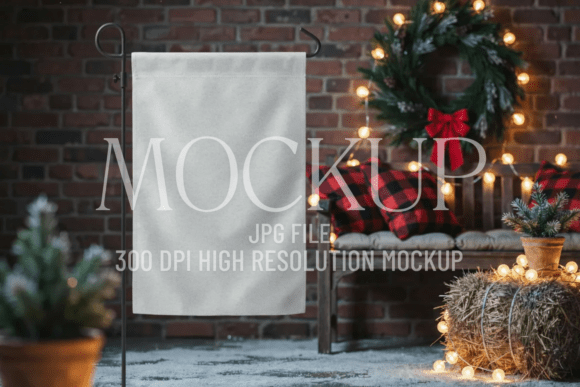
Imagine presenting your seasonal design—whether it’s a cozy autumn quote, a rustic botanical illustration, or a custom logo—with the crisp, polished look of a real garden flag hanging outdoors. That’s exactly what the Fall Garden Flag Sublimation Mockup delivers: a realistic, high-fidelity digital preview that makes your artwork feel tangible, professional, and ready for the real world.
What This Mockup Actually Does (No Guesswork Needed)
This isn’t just a fancy background or a generic template. It’s a carefully crafted, photo-based mockup designed specifically for garden flags—those rectangular banners commonly displayed on stakes in yards, patios, porches, and storefronts during fall. The “sublimation” part means it’s optimized for designs intended for dye-sublimation printing, where vibrant colors and fine detail transfer cleanly onto polyester fabric. But you don’t need to know sublimation to use it. If you create art, quotes, logos, or seasonal branding, this mockup helps you show it off like a pro—no photography studio, lighting setup, or physical sample required.
Why Simplicity Works So Well Here
The ✨ Premium Minimal Mockup version stands out because it removes distractions—not just visually, but functionally. There’s no forced text, no watermark, no cluttered background or artificial shadows competing with your design. What you get is clean space, natural fabric texture, soft outdoor lighting, and subtle flag movement—all captured at 300 DPI in a high-resolution JPG file. That resolution ensures your presentation stays sharp whether you’re sharing it on Instagram, embedding it in a client pitch deck, or uploading it to an Etsy listing.
Real-Life Uses You’ll Recognize
Think about how often you need to show something *before* it exists physically:
- A small-batch maker preparing their first fall collection for a local farmers’ market—they drop their maple-leaf pattern into the mockup and instantly have a lifestyle image for flyers and social posts.
- A freelance designer sending concept options to a café owner who wants seasonal patio signage—the mockup gives context without needing a photo shoot.
- An educator creating printable classroom decor adds a warm “Welcome Fall!” message and shares the mockup image with parents via email—it feels intentional, not clip-art-y.
- A blogger promoting a new digital download shop uses the same mockup across Pinterest pins, blog headers, and product thumbnails—creating visual consistency at zero extra cost.
It’s also ideal for anyone building a cohesive brand identity. Because the mockup has neutral tones, soft natural light, and gentle flag drape, your design remains the clear focus—whether it’s minimalist typography, hand-drawn florals, or bold geometric patterns.
Who Benefits Most—and Why
If you’re just starting out with Canva or Photoshop, this mockup is refreshingly straightforward: open the JPG in your editor, place your design using smart layers (or simple clipping masks), adjust scale and position, and export. No complex PSD files or layer blending modes to figure out. For seasoned designers, it saves hours—no need to composite lighting, match perspective, or retouch fabric folds manually.
Entrepreneurs love it because it bridges the gap between idea and impression. A well-presented mockup builds trust. When customers see your design on a realistic garden flag, they can visualize it in their own space—making them more likely to click “add to cart.” Marketers appreciate how quickly it supports A/B testing: swap in different color schemes or fonts, generate new visuals in minutes, and compare engagement across platforms.
Things to Keep in Mind Before You Use It
First, check your design’s aspect ratio. Garden flags are typically 12" x 18" or 12.5" x 18", so aim for a 2:3 proportion. Stretching a square or wide banner will distort your layout. Second, remember this is a *presentation tool*, not a print file—your final production file should still be built at full size and correct CMYK/RGB mode depending on your printer’s requirements.
Also, while the mockup includes natural lighting and gentle shadowing, it doesn’t simulate every possible environment. If your customer plans to hang the flag under a covered porch versus full sun, slight tone adjustments may help your mockup feel even more authentic—but that’s optional polish, not a requirement.
How It Fits Into Your Creative Workflow
You don’t need to overhaul your process to benefit from the Fall Garden Flag Sublimation Mockup. Tuck it into your usual flow like this:
- Design your artwork in your preferred tool.
- Resize it to match the safe zone indicated in the mockup (or use the included guide if provided).
- Place and blend—most editors support drag-and-drop or layer masking in under a minute.
- Export as JPG or PNG and use it anywhere: Shopify product pages, Instagram carousels, email newsletters, or even printed lookbooks.
Because it’s delivered as a single high-res JPG—no ZIP files, no software dependencies—you can start using it immediately after download. No installation, no license keys, no waiting.
A Small Tool With Real Impact
Great presentation doesn’t require big budgets or technical expertise. It requires clarity, consistency, and attention to how people actually experience your work. The Fall Garden Flag Sublimation Mockup supports all three—giving your fall-themed designs presence, professionalism, and quiet confidence. Whether you're launching a side hustle, updating your shop’s seasonal offerings, or simply sharing joy through thoughtful design, this mockup helps your creativity land with warmth and intention.
And because it’s built to be clean, adaptable, and distraction-free, it grows with you—useful today for a single Etsy listing, and just as valuable next year when you’re building a full seasonal brand system.